


Pick a model. Start your agent.

llmenu reads the models from your LiteLLM gateway, shows price, context and benchmarks side by side, and starts Claude Code, Codex CLI or GitHub Copilot CLI with the one you choose.

Install llmenu brew install --cask schowave/tap/llmenu
Terminal recording: llmenu makes Claude Code the default tool and binds a project to the folder, then opens a menu of the gateway's models with context size, prices and benchmark scores; Tab changes the sort column, typing searches, Enter starts Claude Code with the chosen model.
Recorded against a sample gateway with sample prices and scores.

Choose, don't guess.

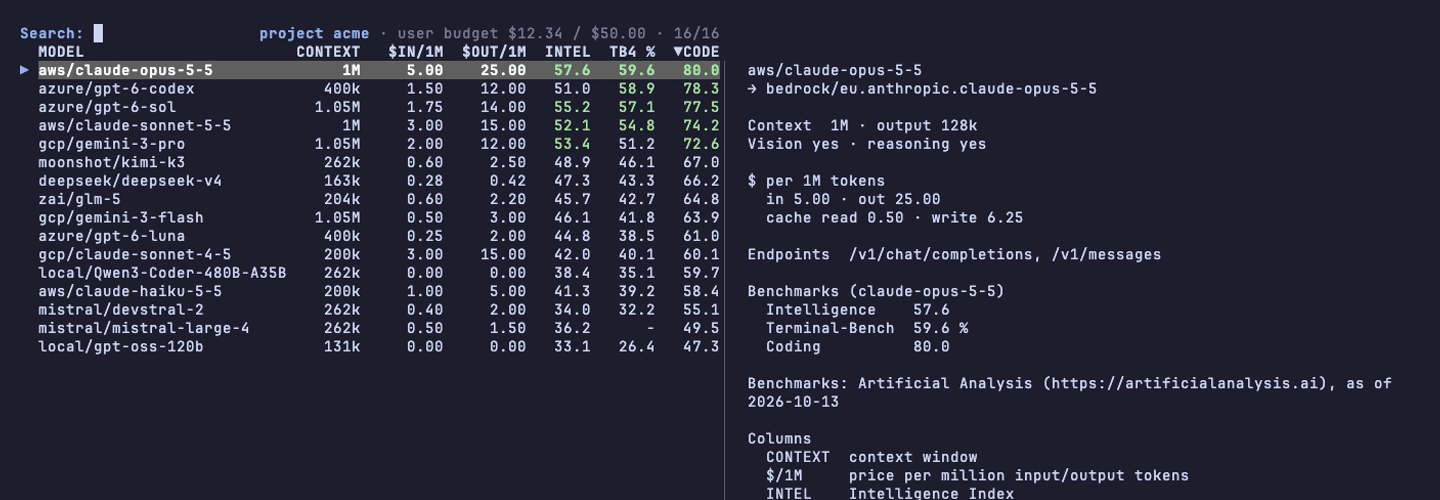
Dozens of models from several providers, aliases like claude-opus-latest, prices that differ by a factor of fifty. The menu puts what matters in one table, sorted by quality or price.

Context
the model's context window, as the gateway reports it
$ in / out
price per million input and output tokens
Intel
Artificial Analysis Intelligence Index
TB4 %
Terminal-Bench, tasks solved
Code
Artificial Analysis Coding Index
The llmenu menu: sixteen models with context, input and output price, Intelligence, Terminal-Bench and Coding scores, sorted by Coding; the detail pane for aws/claude-opus-5-5 shows its Bedrock route, prices and benchmarks.
Typing sonnet in the menu narrows sixteen models down to two.

Type to search

Tab changes the sort column, typing filters, Enter starts the tool. The same model at several providers, say aws/ and gcp/, stays selectable on its own.

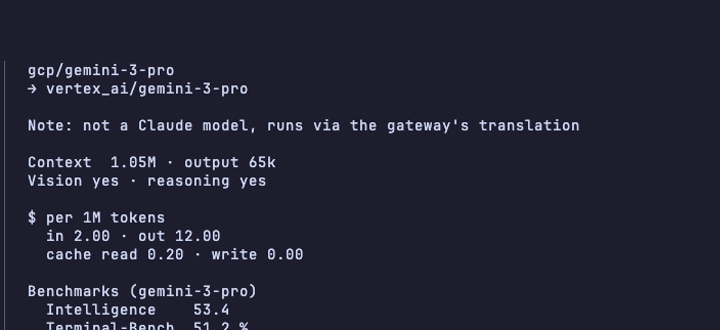
Detail pane for gcp/gemini-3-pro: a note that it is not a Claude model and runs via the gateway's translation, its context, prices and benchmarks.

Every model, not only Claude

The detail pane shows where a model really runs, what it can do and whether the gateway has to translate the API for it.

One gateway, five tools.

Each tool wants the gateway configured its own way. llmenu does the wiring: some tools it starts with the chosen model, others get the gateway's models, limits and prices written into their config. llmenu sync keeps them up to date.

ToolWhat llmenu doesYou run
Claude Codestarts it with the chosen modelllmenu claude
Codex CLIstarts it with the chosen modelllmenu codex
Copilot CLIstarts it with the chosen model, no GitHub loginllmenu copilot
opencodewrites the models into its config, starts it with the keyllmenu opencode
piwrites the models into its configllmenu sync
anything elseprints the chosen model nametool --model "$(llmenu)"
Terminal: llmenu default claude saves Claude Code as the default; llmenu project use acme --here binds the project acme to the folder.

See what you spend.

The menu and Claude Code's status line show the budget of the key in use, yours or the project's, and how much of it is gone.

  • One gateway key per project or cost centre, switched with llmenu project.
  • Bind a project to a folder once, and every start in it uses that key.

Your configs stay yours.

Keys in the keyring

macOS Keychain, Windows Credential Manager or Secret Service. Never in config files or process arguments, and only sent to the gateway they were stored for.

Nothing overwritten

~/.claude, ~/.codex and ~/.copilot stay untouched. In pi and opencode only llmenu's own provider entry changes, and a backup is kept.

Scriptable

llmenu list --json, "$(llmenu)" in any script. Without a terminal nothing ever waits for input. One binary for macOS, Linux and Windows.

Install it.

You need a LiteLLM gateway, its URL and an API key. llmenu does not talk to model providers directly. The benchmark key from Artificial Analysis is free.

brew install --cask schowave/tap/llmenu

Then

llmenu setup     # gateway URL and key, your tools, default models
llmenu claude    # pick a model and start Claude Code
llmenu bench     # optional: benchmark scores for the menu

Or download an archive with signed build provenance from the releases page.